| Bookmark Name | Actions |
|---|
TAFJ Components
This section describes the TAFJ components.
TAFJ Classpath
TAFJ manages the classpath base through the properties file of a project. You no need to setup the CLASSPATH variable environment.
The order of the TAFJ Classpath is:
- <temn.tafj.directory.classes>
- <temn.tafj.runtime.classpath>
- <TAFJ_HOME>/ext
- <temn.tafj.runtime.extended.classpath>
- <temn.tafj.directory.precompile>
You can specify multiple paths in the above keys with a separator : or ;. However, you cannot specify multiple paths in the <temn.tafj.directory.classes> key. That is,
temn.tafj.directory.precompile=/T24/Modules/GB0003:/T24/lib
Each entry has a clear state and the defined order cannot be change.
| Command | Description |
|---|---|
|
<temn.tafj.directory.classes> |
Specifies where the class files will be generated by the compiler. |
|
<temn.tafj.runtime.classpath> |
Specifies where all internal JARs and classpath before ext folder (3rd party JARs and jdbc drivers) will be loaded. |
|
<TAFJ_HOME>/ext |
Specifies where all 3rd party JARs, jdbc drivers and subfolder classpath will be loaded. |
|
<temn.tafj.runtime.extended.classpath> |
Specifies where all internal JARs and classpath after ext folder (3rd party JARs and jdbc drivers) will be loaded. |
|
<temn.tafj.directory.precompile> |
Specifies where all Temenos Transact components and modules JARs, and classpath will be loaded. |
TAFJ Runtime Directories
TAFJ support UD tables. The following key specifies the root of the current directory where all UD tables are located:
“temn.tafj.runtime.directory.current”
In the properties file, the default value of the above key is:
# Specify what will be considered as the "current" directory (eg in an OPEN "." ...)
#
temn.tafj.runtime.directory.current		= <tafj.home>/UD
The default file encoding is UTF-8. You can specify the file encoding of the UD Table with the following key:
temn.tafj.runtime.ud.encoding
In the properties file the default value is:
# By default all UD Tables is no UTF-8 encoding.
# you have to specify the codepage of UD tables
# Latin character ISO-8859-1, cp1252 or UTF-8
temn.tafj.runtime.ud.encoding				= UTF-8
You can specify the location of the &COMO& folder outside the current directory of the UD Tables with the temn.tafj.runtime.directory.como key.
# Specify what is the COMO directory.
#
temn.tafj.runtime.directory.como			= <temn.tafj.runtime.directory.current>/&COMO&
The default file encoding (empty key) is platform specific. You can specify the file encoding of the UD Table with the temn.tafj.runtime.ud.encoding key.
# set the file encoding of the output file COMO
# ex for zOS : temn.tafj.runtime.como.encoding= IBM-1047
# default is ISO-8859-1
#
#temn.tafj.runtime.como.encoding 			= IBM-1047
You can specify the location of the &HOLD& folder outside the current directory of the UD Tables with the temn.tafj.runtime.directory.hold key.
#Specify where is the &HOLD& directory when SETPTR is used with the HOLD option
#
temn.tafj.printer.directory.hold      		= <temn.tafj.runtime.directory.current>/&HOLD&
TAFJ Timezone and Local
TimeZone represents a time zone offset and also figures out daylight savings. You can set the Timezone with the temn.tafj.runtime.timezone key.
In the properties file the default value is:
# set the timezone of the system
#
#ie : temn.tafj.runtime.timezone = Europe/London
temn.tafj.runtime.timezone			=
A locale object represents a specific geographical, political, or cultural region. An operation that requires a locale to perform its task is called locale-sensitive and uses the locale to tailor information for the user. You can set the locale with the temn.tafj.runtime.local key.
In the properties file the default value is:
# set the locale language and country
#
temn.tafj.runtime.local				= en_US
TAFJ Thread or Process
By convention a JBC command (EXECUTE PHANTOM) forks a new OS Process with a new instance of a JVM (Java Virtual Machine). For performance, you can define the temn.tafj.runtime.phantom.as.process key to execute the new process as a thread in the current JVM.
In the properties file the default value is:
# Specify whether a "EXECUTE PHANTOM ..." will be a new process or
# a new Thread. In multiple CPU machines, a new process (true) could
# be more efficient.
#
temn.tafj.runtime.phantom.as.process		= true
When the new process forks a new JVM, you have to specify the environment of the JVM with options. You should use the temn.tafj.runtime.new.process.params key. Options can be any java options:
Usage: java [-options] class [args...]
where options include:
  -d32     		use a 32-bit data model if available
  -d64     		use a 64-bit data model if available
  -server    		to select the "server" VM
  -hotspot   		is a synonym for the "server" VM [deprecated]
         		The default VM is server.
  -D<name>=<value>	set a system property
  -verbose:		[class|gc|jni] enable verbose output
  -ea[:<packagename>...|:<classname>]
  -enableassertions[:<packagename>...|:<classname>]
         enable assertions with specified granularity
  -da[:<packagename>...|:<classname>]
  -disableassertions[:<packagename>...|:<classname>]
         disable assertions with specified granularity
  -esa | -enablesystemassertions
         enable system assertions
  -dsa | -disablesystemassertions
         disable system assertions
  -agentlib:<libname>[=<options>]
         load native agent library <libname>, e.g. -agentlib:hprof
         see also, -agentlib:jdwp=help and -agentlib:hprof=help
  -agentpath:<pathname>[=<options>]
         load native agent library by full pathname
  -javaagent:<jarpath>[=<options>]
         load Java programming language agent, see java.lang.instrument
  -splash:<imagepath>
         show splash screen with specified image

See http://www.oracle.com/technetwork/java/javase/documentation/index.html for more details.
In the properties file the default value is:
#If the phantoms are executed as process, what JVM options to
#use to launch them.
#
temn.tafj.runtime.new.process.params		= -Xmx1024M
TAFJ Precision and Rounding
You can specify the default precision for the runtime by using the temn.tafj.runtime.default.precision key.
In the properties file the default value is:
# Default precision when not specified.
#
temn.tafj.runtime.default.precision      	= 13
You can also specify the rounding of an operation by using the temn.tafj.runtime.rounding.mode key and the rounding of the result by using the temn.tafj.runtime.rounding.mode.result key.
In the properties file the default value is:
# Rounding Mode for operands : HALF_UP(Default) (2.25 -> 2.3 and 2.24 -> 2.2)
# Possible values : HALF_DOWN, HALF_UP, HALF_EVEN, CEILING, FLOOR, UP
#
temn.tafj.runtime.rounding.mode			= HALF_UP

# Rounding Mode result : HALF_UP(Default) (2.25 -> 2.3 and 2.24 -> 2.2)
# Possible values : HALF_DOWN, HALF_UP, HALF_EVEN, CEILING, FLOOR, UP
#
temn.tafj.runtime.rounding.mode.result		= DOWN
TAFJ Runtime Mode
If TAFJ is installed on a Mainframe (zOS), then you need to set the temn.tafj.runtime.zos.mode key to true. This avoids the INPUT statement with timer. Set the correct encoding for logger in TAFJTrace.properties and COMO encoding.
In the properties file the default value is:
# set to true if the runner is on a zOS LPar machine
# and it have to work in legacy mode
#
temn.tafj.runtime.zos.mode		= false
Below is some other specific mode.
# Define if, in case of exception, we are stopping the execution or
# just throwing the exception (in case of TAFJ is used like an API)
#
temn.tafj.runtime.exception.mode			= false

# When set to true a terminating session will be cleaned up.
# All locks released and the database connection closed.
#
temn.tafj.runtime.clean.on.shutdown		= true

# If set to false, data records changed in eclipse will not be loaded.
# into the database. by default the property is false .
#
temn.tafj.runtime.enable.data.records.load    = false
TAFJ Performance
If you are not in development environment, then you need to activate some cache and stop TAFJ to debug code. This is required to improve performance.
In the properties file the default value is:
# If set to false, any 'DEBUG' statement will be ignored.
#
temn.tafj.runtime.enable.debug             	= true

# Performance :cache OPF
#
temn.tafj.runtime.enable.cached.opf		= false

# Performance : internal java TAFJ System_getCache
#
temn.tafj.runtime.use.cache.get			= false
TEC and Logger API
TAFJ has the capability to redirect API message to the logger API (Temenos Transact) to the JMS Topic Queue by using the temn.tafj.runtime.enable.logger.api.jms key.
In the properties file the default value is:
# Enable the Logger api for TEC Items recording using JMS (used by T24Monitor)
#
temn.tafj.runtime.enable.logger.api.jms		= false
TAFJ has the capability to disable any Temenos Transact Logger API or TEC by using temn.tafj.runtime.enable.logger.api and temn.tafj.runtime.disable.tec.
In the properties file the default values are:
# Enable the Logger api for TEC Items (used by T24Monitor)
#
temn.tafj.runtime.enable.logger.api	= true

# Enable TEC Items recording
#
temn.tafj.runtime.disable.tec 		= false
TAFJ JIMI (Independent Metrics Integration)
Check the following properties for JIMI. In the properties file the default is:
#********************************************************************
#
# JIMI
#
#********************************************************************

# Specify if jimi is on, off or can be switched
# 1 : On, can be changed programatically
# 0 : Off, can be changed programatically
#-1 : Off CANNOT be changed programatically.
#
temn.tafj.runtime.jimi.on			    	= 0

# Specify what directory will contains the jimi reports
#
temn.tafj.runtime.directory.jimi 			= <temn.tafj.runtime.directory.current>

# Specify whether we want to append on existing trace files or create
# a new file every times we start jimi.
#
temn.tafj.runtime.jimi.append				= false

# The first index when using the FILEIO option
#
temn.tafj.runtime.jimi.image.index			= 1
TAFJ Monitor
To use TAFJ Monitor, TAFJSessionMonitor should be up and running on the network. TAFJ with the following properties sends all the information to the TAFJSessionMonitor. Read the TAFJSessionMonitor section to know how to setup and start the monitor.
#********************************************************************
#
#  TAFJ Monitor
#
#********************************************************************
# Enable the TAFJMonitorSession
#
temn.tafj.runtime.session.monitor.enable        = 		true

# Host name or IP of where is the TAFJMonitorSession
#
temn.tafj.runtime.session.monitor.host		=		localhost

# TCP port of the TAFJMonitorSession
#
temn.tafj.runtime.session.monitor.port		=		8377
TAFJ Printer
TAFJ uses the JPS (Java Print Service).
- On Windows, JPS use the Printer Manager. You can connect any printer installed on Windows. The Printer should be online.
- On UNIX or LINUX, JPS uses CUPS (Common Unix Printing System). CUPS is not install by default. You need to install it. Please refer to your OS documentation for installation.
In the properties file, category printer, the setup of TAFJ automatically adds your printers online with default driver name PRN #. You can affect the channel by using any drivers’ name.
You can affect minimum of three channels to different printer with the temn.tafj.channel.name.# key. # is the number of the channel.
The default number of printer channels can be increased on demand by using the following property in the properties file:
temn.tafj.printer.num.channels =
The name you associate with the key should match the name of the driver. For example,
temn.tafj.channel.name.0 = PRN2
The channel 0 is link to the driver PRN2.
To install a driver, you need to specify:
- A name to be linked with the channel.
- A device base on the printer manager of windows or CUPS printer name.
- A class driver (by default : com.temenos.tafj.jlp.drivers.jPrinterDriver)
To find the devices online on your OS, use the tFindDevice command.
__________________________________________________________________

Device(s) on your system
__________________________________________________________________

Default printer : >HP Officejet Pro 8600 (Network)<
Printer 0    : >Send To OneNote 2010<
Printer 1    : >Microsoft XPS Document Writer<
Printer 2    : >HP0CE4D2 (HP Officejet Pro 8600)<
Printer 3    : >HP Officejet Pro 8600 (Network)<
Printer 4    : >Fax - HP Officejet Pro 8600 (Network)<
Printer 5    : >Fax<

__________________________________________________________________
Choose the device you want and add to the properties file:
temn.tafj.driver.name.# 		= <The name of a key to link with the channel>
temn.tafj.driver.device.#	= <The name of device>
temn.tafj.driver.class.# 	= com.temenos.tafj.jlp.drivers.jPrinterDriver
# is the next available number of the device. For example,
temn.tafj.channel.name.0 	= PRN0
temn.tafj.channel.name.1 	= PR23
temn.tafj.channel.name.2		= PRN1

temn.tafj.driver.name.0 		= PRN0
temn.tafj.driver.device.0	= HP Officejet Pro 8600 (Network)
temn.tafj.driver.class.0 	= com.temenos.tafj.jlp.drivers.jPrinterDriver

temn.tafj.driver.name.1 		= PRN1
temn.tafj.driver.device.1	= Send To OneNote 2010
temn.tafj.driver.class.1 	= com.temenos.tafj.jlp.drivers.jPrinterDriver

temn.tafj.driver.name.2 		= PRN2
temn.tafj.driver.device.2	= Microsoft XPS Document Writer
temn.tafj.driver.class.2 	= com.temenos.tafj.jlp.drivers.jPrinterDriver
 Redirecting your Reports
It is possible in TAFJ to redirect data destined for the T24 &HOLD& UD directory to another machine or report repository. For example:
temn.tafj.spooler.iohandler.host=10.41.5.52
temn.tafj.spooler.iohandler.port=22
temn.tafj.spooler.iohandler.user=t24user
temn.tafj.spooler.iohandler.password=t24user
temn.tafj.spooler.iohandler.sftp.dir=/home/t24user/tmp

temn.tafj.channel.name.0     = DEFAULT
temn.tafj.driver.name.0        = HP8000
temn.tafj.driver.device.0      = Epson Stylus Photo R200 (M)
temn.tafj.spooler.iohandler.0  = FILEHANDLER_SFTP
temn.tafj.spooler.iohandler.0 = FILEHANDLER_SFTP
With the FILEHANDLER_SFTP IO handler above, the output is being redirected via SFTP to the server 10.41.5.52 on port 22 to the /home/t24user/tmp directory. Jsch-<version>. jar must be included in the classpath. The jar can be found in $TAFJ_HOME/3rdParty/reporting.
Likewise, TAFJ supports Apache Jackrabbit content repository, that is
temn.tafj.spooler.iohandler.0 = FILEHANDLER_JACKRABBIT
Specify temn.tafj.spooler.iohandler.host, temn.tafj.spooler.iohandler.port, temn.tafj.spooler.iohandler.user, and temn.tafj.spooler.iohandler.password specific to where the JACKRABBIT server is running. This uses the remote RMI interface of JACKRABBIT. The JACKRABBIT server must be started with a command similar to:
java -Xmx256m -Djava.rmi.server.hostname=10.41.5.52 -jar jackrabbit-standalone-2.14.0.jar --host 10.41.5.52 --port 8081
For the client, include jackrabbit-core-<version>.jar and jackrabbit-jcr-rmi-<version>.jar. The JARs can be found in $TAFJ_HOME/3rdParty/reporting.
NOTE: Finally, a JCA connector is written for these plugins in an application server context. Refer to the TAFJ-AS TAFJ document for how to deploy and manage this.
TAFJ Database
TAFJ uses JDBC to connect and use a database. Java Database Connectivity is a Java API that enables Java programs to execute SQL statements. This allows Java programs to interact with any SQL-compliant database. Since nearly all relational database management systems (DBMSs) support SQL, and because Java itself runs on most platforms, JDBC makes it possible to write a single database application that can run on different platforms and interact with different DBMSs. JDBC is similar to ODBC, but is designed specifically for Java programs, whereas ODBC is language-independent.
You need to setup four keys to connect to the database:
| Command | Action |
|---|---|
|
temn.tafj.jdbc.url |
URL that describes database connection |
|
temn.tafj.jdbc.driver |
Class that describes the specific Driver for a database |
|
temn.tafj.jdbc.username |
Username to connect |
|
temn.tafj.jdbc.password |
Password |
For example,
#********************************************************************
#
# Database setup
#
#********************************************************************

# URL that describes database connection,
# ex. oracle: 		jdbc:oracle:thin:@<host_or_ip>:1521:<db_name>
# ex. db2: 		jdbc:db2://<host_or_ip>:50000/<db_name>
# ex. ms-sql: 		jdbc:sqlserver://<host_or_ip>:1433;databaseName=<db_name>;integratedSecurity=true
# ex. H2:   		jdbc:h2:tcp://<host_or_ip>/<db_name>
# ex. H2(Embedded):	jdbc:h2:<path_to_my_db>
#
temn.tafj.jdbc.url	= jdbc:db2://158.35.69.124:50000/t24mb

# Class that describes the specific Driver for a database,
# ex. oracle: 		oracle.jdbc.driver.OracleDriver
# ex. db2: 		com.ibm.db2.jcc.DB2Driver
# ex. ms-sql: 		com.microsoft.sqlserver.jdbc.SQLServerDriver
# ex. H2:        org.h2.Driver
#
temn.tafj.jdbc.driver	= com.ibm.db2.jcc.DB2Driver

temn.tafj.jdbc.username 	= tafjdb
temn.tafj.jdbc.password 	= secret
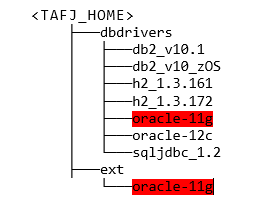
You should copy the targeted database drivers to <TAFJ_HOME>/ext. You can find these drivers in <TAFJ_HOME>/dbdrivers and copy them to <TAFJ_HOME>/ext.
That is for oracle 11g database
TAFJ Lock Manager
To configure the client system to use the distributed lock service, each client user must be configured with the TAFJ Locking mechanism. For better performance, all users of the same database must be configured with exactly the same distributed lock service parameters, otherwise locks will not work correctly and data inconsistencies may occur.
You need to setup the following keys:
| Command | Action |
|---|---|
|
temn.tafj.locking.mode |
TAFJ Distributed Lock mechanism mode. |
|
temn.tafj.locking.hostname |
Hostname or the IP address of the system where the distributed lock service is executing. |
|
temn.tafj.locking.port |
The socket port number on which TAFJ distributed lock service is listening. |
|
temn.tafj.locking.callstack |
Bring the current call stack over to the lock manager. |
|
temn.tafj.locking.name |
Override the URL as unique key for DBInstance. |
TAFJ Locking Mechanism
| Lock Manager | Description | Advantages | Disadvantages |
|---|---|---|---|
|
MEM
|
Part of the same JVM than the process running. |
|
|
|
JDBC
|
Uses the same URL than the database. It is a table in the database. The table name used for the lock is TAFJ_LOCKS. |
|
|
|
PROC / PROCHASH
|
External process on a server in the network. The keys “temn.tafj.locking.hostname” and “temn.tafj.locking.port” should be set. The PROCHASH is the same mechanism as PROC but the lock is a hash. It cannot be monitor. |
|
|
|
ORCL / MSQL
|
Uses the lock engine of the database via an API. |
|
|
Add Bookmark
save your best linksView Bookmarks
Visit your best links BACK
BACK


Are you sure you want to log-off?